How to share a file from cloud storage without giving away your keys
Someone needs a 2 GB file out of your bucket. Do not send them your access key, and do not make the bucket public. Here is what to do instead, and how to choose.
Someone needs a file that lives in your bucket. A 2 GB video, a client deliverable, a database export. Email will not take it, and the obvious shortcuts are all worse than they look.
There are four ways to do this. Two of them are bad, and knowing exactly why they are bad tells you which of the other two to use.
The two you should not use
Sending your access keys
It is quick, and it is the single worst option. An access key is not a password for one file — it is the credential for everything that key can reach. Whoever holds it can read every object in scope, upload new ones, and delete what is there. It does not expire. You cannot revoke it for one person. And once it is in a chat log or an email thread, you have no idea where it has been copied to.
If you have already done this, rotate the key. That is the only fix.
Making the whole bucket public
Flipping a bucket to public access to share one file is the other common shortcut. It works instantly, which is exactly the problem: it also exposes every other object in that bucket, including the ones you forgot were there.
Public buckets are also enumerable more often than people expect. A bucket that allows
listing hands anyone a full inventory. Even without listing, predictable key names —
invoices/2026-01.pdf, invoices/2026-02.pdf — are trivially
guessable.
The asymmetry matters. Sharing one file is a small, temporary need. Making a bucket public is a large, permanent change. Do not solve the first with the second.
Option 1: a presigned link
This is the right answer most of the time. A presigned link is a normal URL with a cryptographic signature attached, which grants access to one object for a limited time. The bucket stays private. No credentials change hands. The recipient needs no account, no client and no instructions — they click it and the file downloads.
What is actually in the URL: the object's address, an expiry timestamp, and a signature proving the link was created by someone holding a valid key. The storage service checks the signature and the clock on every request, then serves the file or refuses.
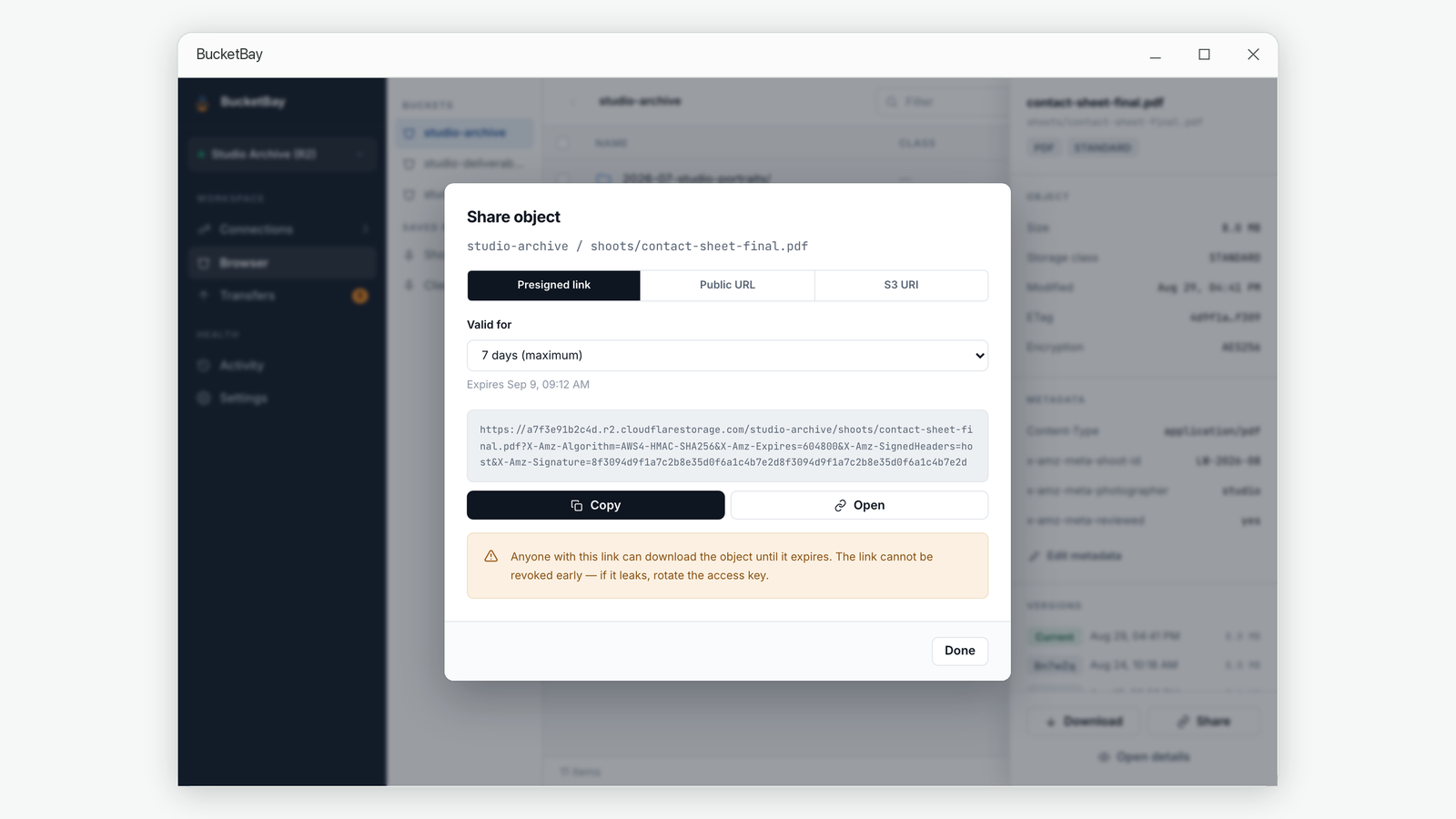
Two things to know before you send one
Seven days is the ceiling. The signature format used by S3 and compatible services will not sign for longer than a week. This is not a limitation your software chose — asking for thirty days either fails or gets quietly clamped. If someone needs access for a month, a presigned link is the wrong tool.
You cannot revoke one. Once created, a presigned link works until it expires. There is no button to cancel it. If a link leaks, your only real option is to rotate the key that signed it, which invalidates every link that key created. This is the single strongest argument for short expiry times: choose an hour when an hour will do, not seven days by reflex.
Picking an expiry
| Situation | Reasonable expiry |
|---|---|
| Sending a file to someone who is waiting for it right now | 15 minutes to 1 hour |
| A colleague will pick it up today | 1 day |
| A client in another timezone, over a weekend | 2–3 days |
| Anything longer | Use a public URL on a dedicated bucket instead |
Option 2: a public URL on a bucket meant to be public
Some files are genuinely meant to be readable by anyone, forever: images on a website, downloads on a docs page, assets referenced from an app. For those, an expiring link is the wrong shape — you would have to regenerate it every week.
The right structure is a separate bucket that is public by design, holding only things you are happy for the world to have. Your private bucket stays private. The public one is public, and nothing sensitive is ever put in it.
This is a deliberate decision made once, in your provider's console, not a switch you flip for one file and forget to flip back.
The address is not something software can discover
Worth knowing, because it surprises people: once a bucket is public, the URL it is served at is invented by the provider and cannot be read back through the S3 API. There is no call for it. The forms differ completely:
- Cloudflare R2 gives you
pub-<random>.r2.dev, where the random part has nothing to do with your account or bucket name — or a custom domain you attach. - Amazon S3 answers on the bucket's own hostname, or on a CloudFront domain if you put a CDN in front.
- Backblaze B2 uses
f<nnn>.backblazeb2.com/file/<bucket>/.
So any tool offering to copy a public link has to be told the base address once, per bucket. Copy it from your provider's console the first time; after that the tool can build the per-object URL for you.
Which to use
| Presigned link | Public URL | |
|---|---|---|
| Bucket visibility | Stays private | Public by design |
| Lifetime | Up to 7 days | Permanent |
| Revocable | No — only by rotating the key | By making the bucket private again |
| Good for | One-off handovers, client deliverables, anything confidential | Website assets, public downloads, documentation files |
| Bad for | Permanent links you would have to keep renewing | Anything you would not put on a public web page |
A checklist before you send anything
- Is the file confidential? If yes, it belongs in a private bucket and goes out as a presigned link, never as a public URL.
- How long does access genuinely need to last? Pick the shortest period that works. You cannot shorten it later.
- Are you about to paste a key anywhere? Stop. There is no situation where sending an access key is the right way to share a file.
- Is the link going somewhere that keeps history? Chat and email archives outlive the link's usefulness. Short expiry limits the damage.
- Should this bucket be public at all? If more than a couple of files need permanent public access, make a bucket for exactly that and keep everything else out of it.
Common questions
Can I make a presigned link last longer than 7 days?
No. The AWS Signature Version 4 format caps the expiry at seven days, and S3-compatible services inherit that limit. For permanent access, use a public bucket instead.
Can I cancel a presigned link I already sent?
Not individually. The link is valid until it expires. The only way to invalidate it early is to rotate the access key that signed it, which also invalidates every other link that key created.
Does the recipient need an account or any software?
No. A presigned link is an ordinary HTTPS URL. Clicking it in any browser downloads the file.
Is a presigned link safe to post publicly?
Treat it as a secret. Anyone holding it has access until it expires, so it is as sensitive as the file itself for that period.
How do I find my bucket's public URL?
In your provider's console, on the bucket's public access or custom domain settings. It cannot be retrieved through the S3 API, because the API has no call that reports it.
Related guides
- Why large uploads to cloud storage fail, and how resuming actually works
- Connecting Cloudflare R2 to an S3 desktop client
About BucketBay. BucketBay is a desktop app for S3-compatible object storage — Amazon S3, Cloudflare R2, MinIO, Backblaze B2, Wasabi and anything else that speaks the protocol. It does the things described above without a browser tab or a command line. View it in the Microsoft Store.